

The project page
The project page
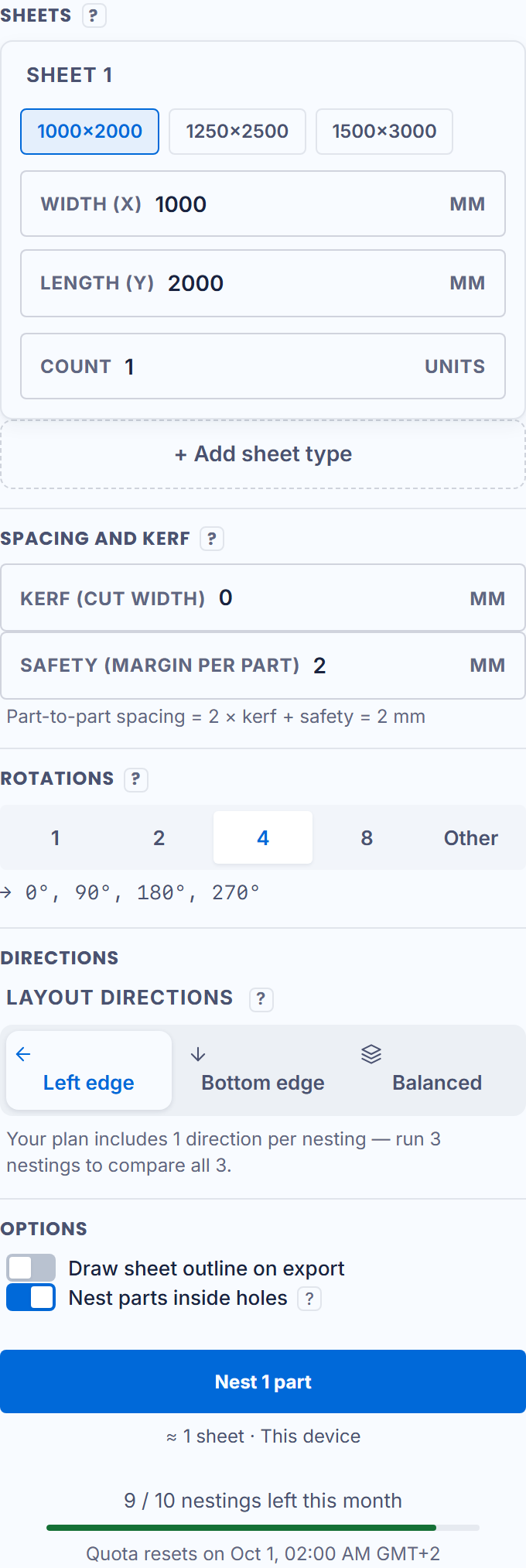
Section titled “The project page”The project page is the workshop: the sheet and the parts on one side, the settings on the other, the part cards below. The bar above sums up the job — parts, dropped files, area, sheets estimated at this spacing, best possible density.
The sheets
Section titled “The sheets”As many sheet types as your stock: width (X), length (Y) and quantity of each type, with standard industry sizes to save time. One format is enough? One line. Full sheets and offcuts? Two lines. On the free plan, a job nests on as many sheets as it needs and you download the first 2.
On “This device” projects, “Import a sheet (DXF)” adds a sheet of any shape — round blank, offcut, notched plate — read from a DXF; its row carries the “Imported outline” badge and an “Edit zones” button for the forbidden zones. See Custom sheet from a DXF. The “first 2 sheets” download rule applies to rectangular sheets; on an imported sheet, the cut files take the Unlimited plan.
The spacing
Section titled “The spacing”This is THE setting that protects your parts: the rule is written under the field — spacing = 2 × kerf + safety. The kerf (cut width) is what your torch eats; the safety is your margin per part. Spacing finer than 0.05 mm triggers a warning: finer than a laser kerf, parts may touch at cutting.
The rotations
Section titled “The rotations”The allowed angle step: 90° for rectangles, 180° when upside down does not matter, a finer step to save more material. “No rotation” keeps every part at 0° — the choice for oriented engraving.
The layout direction
Section titled “The layout direction”Which edge the parts pack against: left edge, bottom edge, or a balance of both — in the drawing’s coordinate system, the on-screen arrow shows the way. Fewer directions checked, faster result. On the free plan, one direction.
The options
Section titled “The options”- Nest parts inside holes: small parts can settle in the cutouts of large ones. Beyond 2.4 mm of spacing the option disables itself — an engine limit, said on screen;
- Draw sheet outline on export: adds a frame around the placed
parts to the DXF, on the
OUT_SHAPElayer. The sheet itself is always drawn on theBIN_BOUNDARYlayer. On an imported sheet the frame is not drawn: the file carries the true outline and the forbidden zones (FORBIDDEN_ZONElayer).
The Nest button starts the computing; a Cancel button appears while the engine runs.