
Nesting for Laser Cutting: Fiber Shops and CO2 Makers Don't Have the Same Problem
Ask a fiber laser owner and a diode laser hobbyist about nesting and you will get two different answers. The fiber owner has a nesting tool bundled with the machine. The hobbyist has a quick-nest button in their laser software. Both of them still leave material on the table, and not for the same reason.
Laser cutting is two worlds, and the nesting problem splits right down the middle.
The two laser worlds
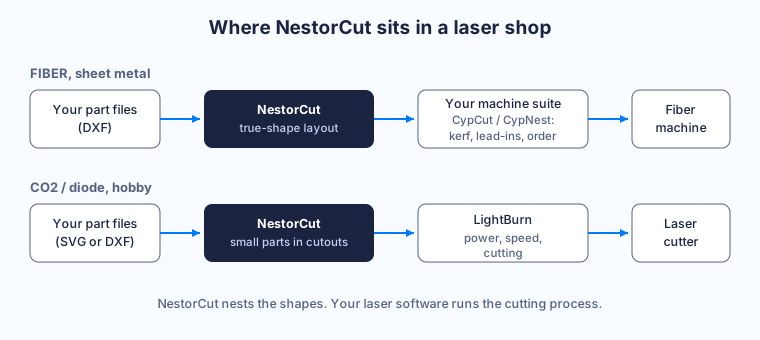
Fiber lasers cut metal. Sheet metal, mostly steel, stainless and aluminum, on machines that cost as much as a car. These machines almost always ship with a control and CAM suite, most commonly the CypCut family from Bochu with its CypNest nesting module. That suite owns the cutting process: kerf compensation, lead-ins, piercing, cutting order, the works.
CO2 and diode lasers cut everything else. Plywood, acrylic, leather, cardboard. This world runs on LightBurn for the most part, sometimes on the software that came with a hobby machine. Here the workflow usually starts in a design tool, Inkscape for a lot of people, and ends with a file sent to the laser.
Two different worlds, one shared habit: nesting gets treated as a side feature of the cutting software. And nesting is not a side feature. It decides how much of your sheet becomes parts and how much becomes scrap.
The fiber problem: your suite nests, but it nests its way
CypCut-style suites are good at running the machine. Their built-in nesting is built for it too, and on rectangular-ish parts it does a fine job.
The pain starts with real parts. Brackets with notches, gaskets with bolt holes, art panels with cutouts in the middle. When shapes get irregular, a nesting module that leans on part rectangles starts wasting the gaps between them. And when your order is 40 pieces across 3 different sheet sizes, you want the software to tell you exactly how many sheets to load, and what leftovers you keep.
There is also a workflow fact that surprises nobody who runs production: the suite that runs your machine does not like being told how to do its job. You will not replace it. You should not have to.
The fix is upstream. Nest the true shapes first, in a tool that does nothing else, then hand the finished layout to your suite as a DXF. Your suite keeps full control of kerf, lead-ins and cutting order, because those live in the cutting process. The nesting step only needs to leave room between parts, kerf plus a margin, and the process parameters fit without collision.
One steel sheet costs between 150 and 230 €. Stainless and aluminum cost more. On a fiber machine, a denser layout is not a nice-to-have, it is the difference between 12 sheets and 11 on an order.
The CO2 problem: quick nest runs out of road fast
In the LightBurn world, nesting is a convenience button. Drop your parts, hit quick nest, get a layout good enough for a dozen coasters.
The button stops being enough when the job grows. Irregular shapes that could rotate and interlock stay packed side by side. Small parts sit next to big ones instead of dropping into the big ones’ cutouts. Nobody tells you what usable offcut is left on the sheet when the job is done, so the remainder goes back on the shelf with no label and no plan.
If you cut 3 mm plywood for fun on weekends, quick nest is fine. If you sell your cuts, the sheet is a cost line, and packing quality shows up directly in your margin. That is where a dedicated true-shape nester changes the math: parts rotate and interlock for real, small parts nest inside the cutouts of large ones automatically, and the leftover is measured and reported as a reusable piece instead of a mystery.
Export the finished layout as SVG or DXF, import it in your laser software, run your usual settings. Nothing about your machine changes.
What better nesting actually buys
Whether the sheet is steel or plywood, the arithmetic is the same. A tighter layout means more parts per sheet. Fewer sheets per order. On the free plan, no card needed, you can run one of your real jobs and read the material saved on the result screen. We explained the whole method in our article on what 2D nesting is.
The honest version: there is no universal savings percentage. It depends on your parts, your quantities and your sheet sizes. What is true is that hole nesting and true-shape rotation are usually where the biggest wins hide, because they fill spaces that rectangle-based nesting leaves empty by design.
Where NestorCut fits
NestorCut does one job: it nests your part shapes on your sheet sizes, in true shape, across as many sheets as the order needs. You import DXF, SVG or DWG, each part is validated and previewed, you set quantities, allowed rotation and grain direction, and you get 3 layouts to compare: densest, largest reusable offcut, or balanced. You download DXF per sheet, SVG previews, or a ZIP of the whole job. No G-code, no post-processor: your laser software stays the boss of the cutting process, exactly like today.
The engine is the same research-grade one for every plan, and identical jobs produce identical layouts. Free accounts compute locally in the browser, so files never leave your machine, and the zero-knowledge vault is available on every plan for when you want your project files encrypted with a key we never see.
If you work with metal on a fiber machine or plywood on a CO2, the test costs nothing: run the demo project, more than 300 parts already loaded, one click, and look at what a tighter layout does to the leftover. One saved sheet usually covers the month.