Nesting Software and Data Privacy: Where Your DXF Actually Goes
Uploading a customer’s drawing to an online tool means sending a piece of your work to someone else’s computer. If you cut parts for clients, you have asked yourself the question: who can read my file once it leaves my machine?
Most vendors answer with a privacy policy written by lawyers. Here you get the shop answer, with diagrams: where the file goes, who can read it at each step, and what we refuse to promise.
Three modes, three privacy levels
NestorCut offers three ways to run a nesting. The difference is concrete: where your parts sit while the work happens, and who can read them.
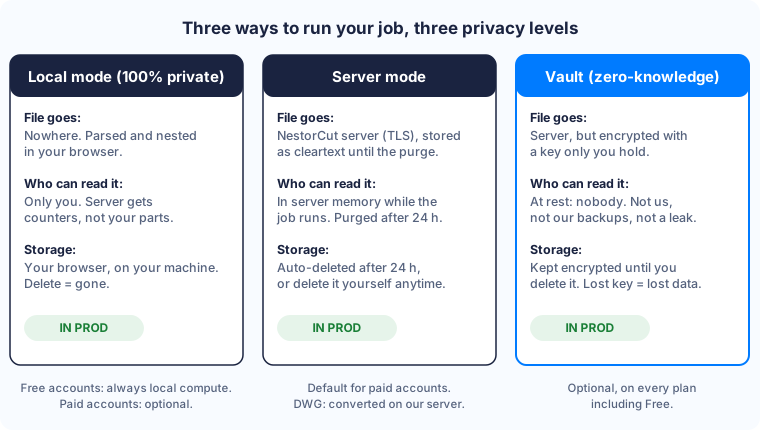
- Local mode, as a 100% private project. The file never leaves your machine: parsing, nesting and exports all happen in your browser.
- Server mode. The file goes to our server over an encrypted connection, is processed there, then deleted automatically after 24 hours.
- Vault (zero-knowledge). The file is stored encrypted with a key only you hold. “Zero knowledge” means exactly what it says: we do not know your key. At rest, nobody can read you. Not us, not our backups.
Free accounts always compute locally. Paid accounts choose per job; server mode is the default because it has more compute power. One exception covers every case: DWG files must be converted on our server, so a DWG always transits through us: a project containing one cannot be 100% private, and the app tells you so clearly.
Local mode: your file stays home
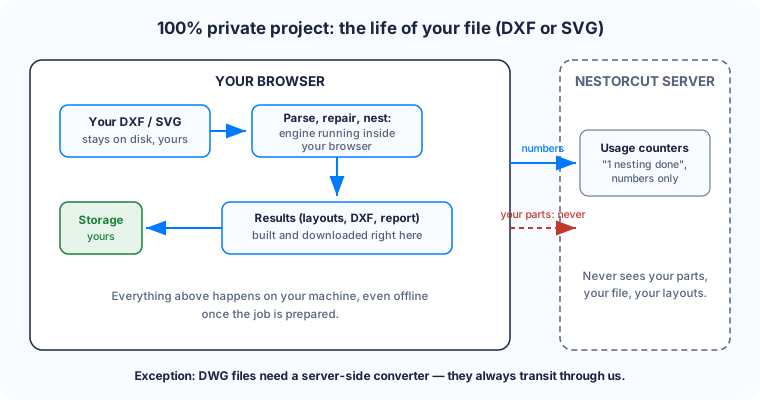
The nesting engine runs right inside your browser, on your machine. Nothing to install. (For the curious: it is written in Rust and compiled to WebAssembly, a technology that lets a real program run inside a browser.) New projects are 100% private by default (you can opt out for a cloud project at creation). Here is the life of your file, concretely, for DXF and SVG files:
- Your file is parsed and repaired on the spot. Open contours are closed, duplicates removed, holes detected, without sending anything anywhere.
- The engine computes the layouts on your machine. You can watch it work live, and the elapsed time is your processor’s time, not ours.
- The results (layout previews, cut-ready DXF, material report) are built on your machine and kept in your browser’s local storage.
- The server only receives counters: “1 nesting done”, the fill rate achieved, that kind of number. No file, no drawing. Not even a coordinate.
Paid plans already use several of your processor’s cores for this (4 parallel walks on Unlimited, 8 on Pro; Free uses 1).
Once the job is prepared, you can even pull the network cable: the solve and the downloads keep working. And if you delete the project, the data is gone, because it only ever existed on your side.
Without the 100% private option (a cloud project computed on your device), the source file still transits through the server for parsing and is deleted after 24 hours like any server-mode file. Your results never leave your browser either way.
Server mode: what really happens
Server mode exists for one simple reason: more compute power delivers the same result sooner on big jobs. Here is what happens to your file, step by step:
- Sent over an encrypted connection (the padlock in your address bar), then stored on our server, in France, until the purge.
- During the solve, our workers read your file into the server’s live memory. Between upload and purge, the file sits in our database in cleartext, which is exactly what the 24-hour purge (and the vault, for anything sensitive) exists for.
- After the solve, the results stay available for download until the purge.
- After 24 hours, the files are deleted automatically. You can also delete the project yourself at any time, from your account, without asking anyone.
Now here is what most vendors would rather not print: while a job runs on our server, your file is there in readable form, in the machine’s memory. An administrator could theoretically look at it. That is exactly why local mode exists. If the drawing is sensitive, run it locally.
Vault zero-knowledge: encrypted with a key we do not have
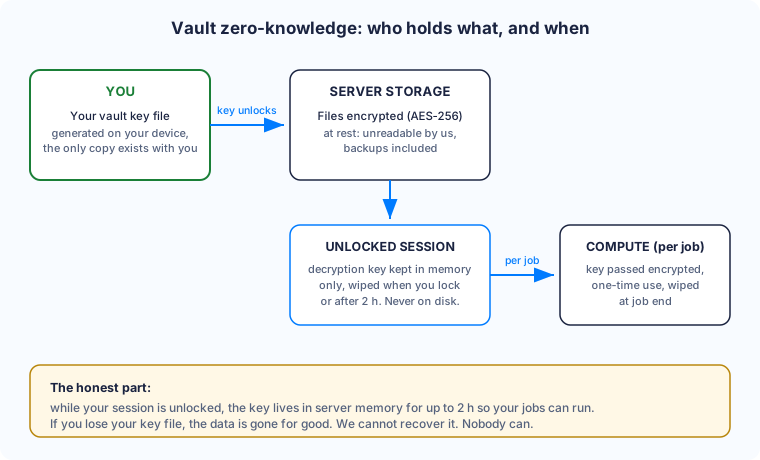
For client drawings you want to keep available online without trusting anyone’s disk, there is the vault. Files inside are encrypted with a recognized standard (AES-256) and a key generated on your device, delivered as a small file you download and keep safe. The only copy of that key is with you.
- At rest, your files are unreadable: not by us, not by someone getting their hands on a backup or on the server itself.
- When you unlock a session, the key passes into the server’s memory, for as long as your jobs need to run. It is wiped as soon as you lock, or automatically after 2 hours. It is never written to disk.
- For each job, the compute process receives the key through a one-time encrypted exchange, uses it in memory, then wipes it at the end of the job, whether it succeeds or fails.
Fair warning: if you lose your key file, your vault data is gone. We cannot recover it, and that is on purpose. The vault is available on every plan, including the free one: privacy should not be a luxury.
What we do not promise
Privacy promises tend to hold until you look closely. With us, every sentence in this article is checked against the code before it goes public. So here is what you will never read here:
- “We cannot read your files”, said about server mode. During the solve, the file is readable in the server’s memory. We won’t tell you otherwise: that is the whole reason local mode exists.
- “Your designs are safe because our code is secret.” It is not: the local mode program is downloaded by your browser to run, so anyone can keep a copy. We do not bet on secrecy. We bet on a good tool and on promises you can check.
What is still in development
One work item is underway but not in production. Until it is live, it is not a promise:
- Turbo mode for Pro accounts: splitting one job between your browser and our servers to solve faster. Still at the specification stage.
Our rule is simple: we only talk publicly about a feature once it is actually running in production. This article follows that rule.
Do not take our word for it: check
You can verify all of this yourself, without installing anything:
- Open your browser’s developer tools (F12 key), Network tab.
- Run a full nesting on a 100% private project, from dropping the file to downloading the DXF.
- Look at what goes out to our servers. You will find neither your file nor your parts: just your account login, a nesting counter and the job status.
If you ever see something else, write to us: the contact page is one click away.
Try it on your own files
NestorCut is free for 10 nestings a month, no credit card required. Free accounts always compute locally. New projects are 100% private by default, so your first job doubles as the simplest privacy test there is: your file never leaves your machine.